The programming model gives us a high level idea of how to write CUDA programs. Also, we need to know how to debug the program using the toolchains.
There are several key points that we need to be aware of in the GPU programming:
- Kernel Function
- Memory Management
- Thread Management
- Streams
A typical environment usually encompasses several CPUs and GPUs. They use PCIe to communicate with each other. The memory is strictly isolated between CPU and GPU (though they share uniform addressing). A complete CUDA program can be executed in the following way:
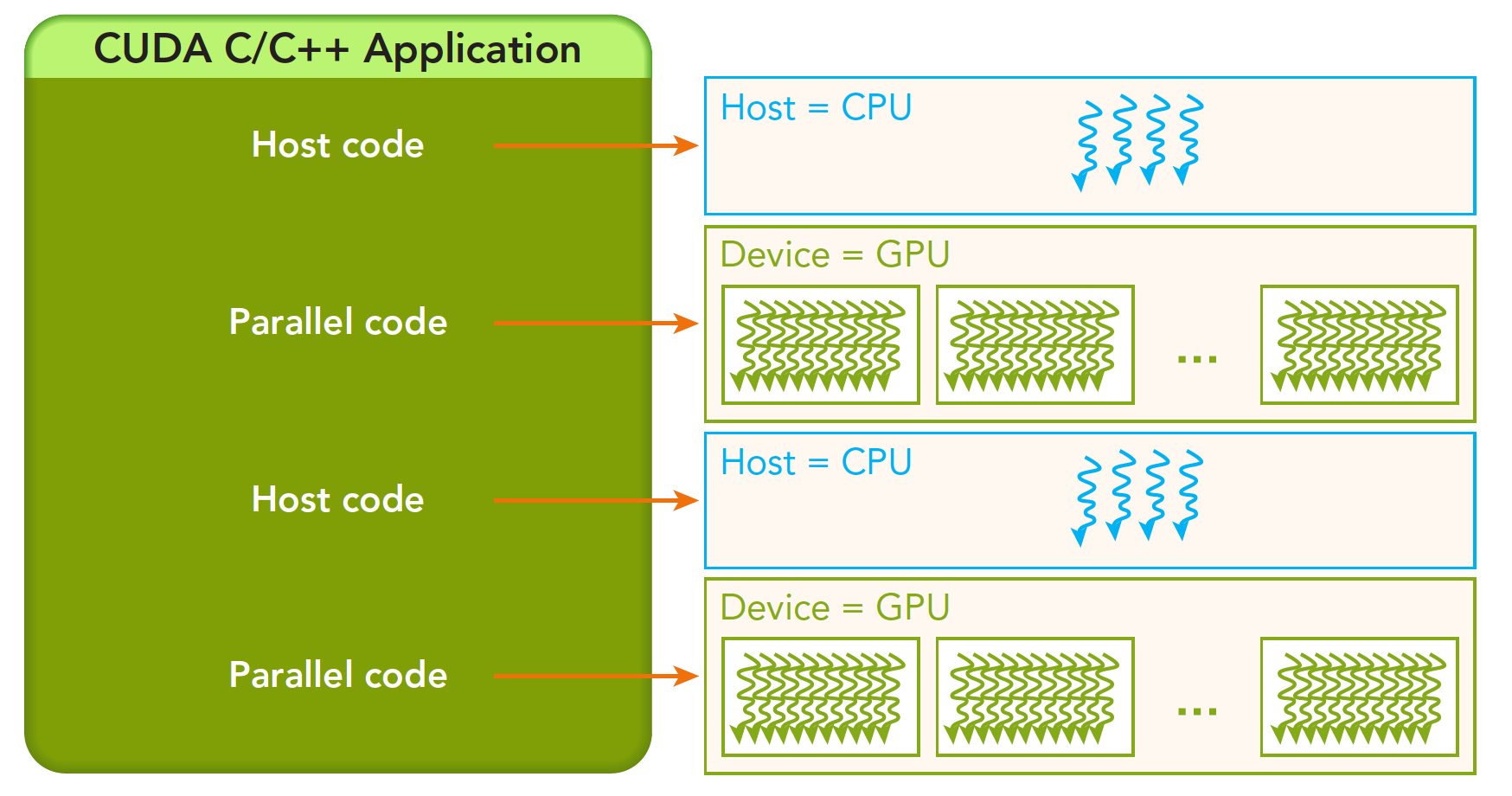 The host code is followed by the parallel code. And it will be returned immediately to the main thread. In other word, when the first parallel code is running, the second host code is likely to run as well simultaneously.
Memory
We will first take a look at memory. Similar to CPU, we have several API to control the memory, like cudaMalloc, cudaMemcpy, cudaMemset and cudaFree. Familiar hah? They resemble the C functions that we are using to control the CPU memory.
We first take a look at cudaMemcpy, the signature of this function is
cudaError_t cudaMemcpy(void * dst,const void * src,size_t count,
					   cudaMemcpyKind kind)
kind denotes several types of memory copy:
cudaMemcpyHostToHostcudaMemcpyHostToDevicecudaMemcpyDeviceToHostcudaMemcpyDeviceToDevice
Let’s first see an example of adding two numbers repeatedly.
#define N 1000000
#include <iostream>

__global__ void add(float *out, float *a, float *b, int n) {
    for (int i = 0; i < n; i++) {
        out[i] = a[i] + b[i];
    }
}

int main(int argc, char **argv)
{
    float *a, *b, *out;

    a = (float *)malloc(N * sizeof(float));
    b = (float *)malloc(N * sizeof(float));
    out = (float *)malloc(N * sizeof(float));

    for(int i = 0; i < N; i++){
        a[i] = 1.0f; b[i] = 2.0f;
    }

    add<<<1, 1>>>(out, a, b, N);

    std::cout << out[0] << std::endl;

    free(a);
    free(b);
    free(out);
}
If you run the code, you will find that it can be compiled but the program does not output the right result. This is because we allocate the memory in CPU. As we said above, they have their own memory space. CPU cannot directly access GPU memory, and vice verca. We call CPU memory as host memory and GPU memory as device memory.
To this end, we need modify our program. First of all ,we need to allocate the device memory using cudaMalloc,
cudaMalloc(void **devPtr, size_t count)
where devPtr represents the device pointer to the allocated memory.
#define N 1000000
#include <iostream>

__global__ void add(float *out, float *a, float *b, int n) {
    for (int i = 0; i < n; i++) {
        out[i] = a[i] + b[i];
    }
}

int main(int argc, char **argv)
{
    float *a, *b, *out;
    float *d_a, *d_b, *d_out;

    a = (float *)malloc(N * sizeof(float));
    b = (float *)malloc(N * sizeof(float));
    out = (float *)malloc(N * sizeof(float));

    for(int i = 0; i < N; i++){
        a[i] = 1.0f; b[i] = 2.0f;
    }


    cudaMalloc(&d_a, N * sizeof(float));
    cudaMalloc(&d_b, N * sizeof(float));
    cudaMalloc(&d_out, N * sizeof(float));

	// Copy to device memory
    cudaMemcpy(d_a, a, N * sizeof(float), cudaMemcpyHostToDevice);
    cudaMemcpy(d_b, b, N * sizeof(float), cudaMemcpyHostToDevice);

    add<<<1, 1>>>(d_out, d_a, d_b, N);

	// Copy back to host memory
    cudaMemcpy(out, d_out, N * sizeof(float), cudaMemcpyDeviceToHost);

    // Verification
    std::cout << "out[0] = " << out[0] << std::endl;

    cudaFree(d_a);
    cudaFree(d_b);
    cudaFree(d_out);
    free(a);
    free(b);
    free(out);
}
We first malloc the host memory for a, b and out. And we initialize them. Afterwards, we cudaMalloc the device memory and use cudaMemcpy to copy the host memory to the device memory. Then we call the kernel function. Afterwards, we retrieve the d_out results to CPU.
Here we do not call cudaDeviceReset() or cudaDeviceSynchronize() because cudaMemcpy is a blocking function. Specifically, cudaMemcpy ensures that all preceding CUDA operations have completed before it starts copying data.
Here we introduce a profiling scheme nvprof. Note that nvprof is a legacy profiling and has now been merged into Nvidia Nsight Systems. It is a statistical sampling profiler with tracing features. nvsys profile is the standard and fully formed profiling description. However, we will use nsys nvprof for now for simplicity. We will use the nsys tool frequenctly. We can profile the program using nsys nvprof,
nsys nvprof ./vector_add
And you can see some details of profiling:


Now we return to the explanation of <<<M, T>>>. It is a kernel execution configuration to tell CUDA how many threads to launch on GPU. CUDA organizes threads into a group called thread block. Kernel can launch multiple thread blocks, in a grid structure.
 Therefore,
 M denotes the number of blocks in the grid while T is the number of parallel threads in each block.
Thread
We now consider the thread of GPU. Note that there is only one grid for each kernel function. And there can be numerous blocks in the grid, with numerous threads in the blocks. The thread in the same block can collaborate with synchronization and shared memory. Thread in different blocks are physically isolated!
Thread, Block, Grid
Every thread is running the same code. How can we distinguish those threads? We can number them given the coordinates:
blockIdx: the index of block in the gridthreadIdx: the index of thread in the block There are three coords in the structure:x,yandz. For example, we can useblockIdx.x. The range is defined byblockDimandgridDim, respectively. The grid is usually divided into 2D block and the thread in the block is 3D.
We can use the following code to have a more precise understanding:
#include <cuda_runtime.h>
#include <iostream>
#include <stdio.h>
using std::cout;
using std::endl;
__global__ void checkIdx(void)
{
printf(">>>>>>>>>>>>>>>>>>>>>>>>>>>>>>>>>>>> checkIdx >>>>>>>>>>>>>>>>>>>>>>>>>>>>>>>>>>>>>>>\n");
printf("threadIdx:(%d,%d,%d) blockIdx:(%d,%d,%d) blockDim:(%d,%d,%d) gridDim(%d,%d,%d)\n",threadIdx.x,threadIdx.y,threadIdx.z,\
blockIdx.x,blockIdx.y,blockIdx.z,blockDim.x,blockDim.y,blockDim.z,
gridDim.x,gridDim.y,gridDim.z);
}
int main()
{
int nElem = 6;
dim3 block(3);
dim3 grid((nElem + block.x - 1) / block.x); // grid(2)
cout << "grid.x: " << grid.x << ", grid.y: " << grid.y << ", grid.z: " << grid.z << endl;
cout << "block.x: " << block.x << ", block.y: " << block.y << ", block.z: " << block.z << endl;
checkIdx<<<grid, block>>>();
cudaDeviceReset();
return 0;
}```
And the output is
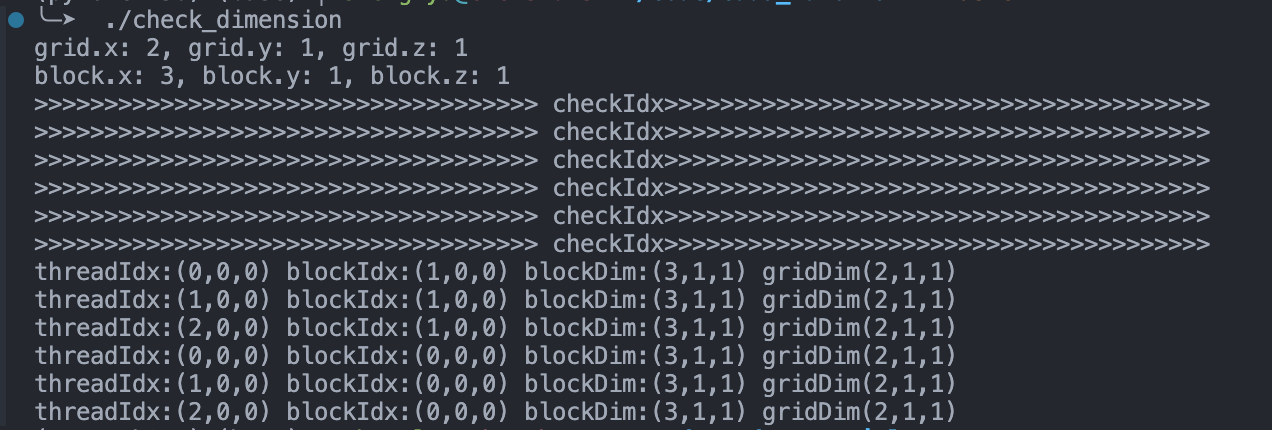
We define `block(3)` to denote each block contains 3 threads in the x-dimension, and no threads on y or z dimenstion. Similarly, `grid(2)` represents the grid contains 2 blocks in the x dimension.
How many threads we have: # of blocks * # of treads per block = 6.
We can also find that the code is not executed in sequence in the kernel. This is crucially different from CPU programming.
### Add in multiple threads
In the next, we will modify the `_add()` function using multi-threads. We start by 256 threads by defining:
```cpp
add<<1, 256>>(N, x, y)
We need also alter the kernel function by manually manipulating allocating the threads and blocks:
__global__ void add(float *out, float *a, float *b, int n) {
    int index = threadIdx.x;
    int stride = blockDim.x;
    for (int i = index; i < n; i+=stride) {
        out[i] = a[i] + b[i];
    }
}
In this code, we explicitly leverage threadIdx.x to manage the index of the current thread within its block. blockDim.x contains the number of threads in the block.
Now we want to see how fast it is. After run nvcc, we can run
nsys nvprof ./vector_add_thread
And we can observe the results.
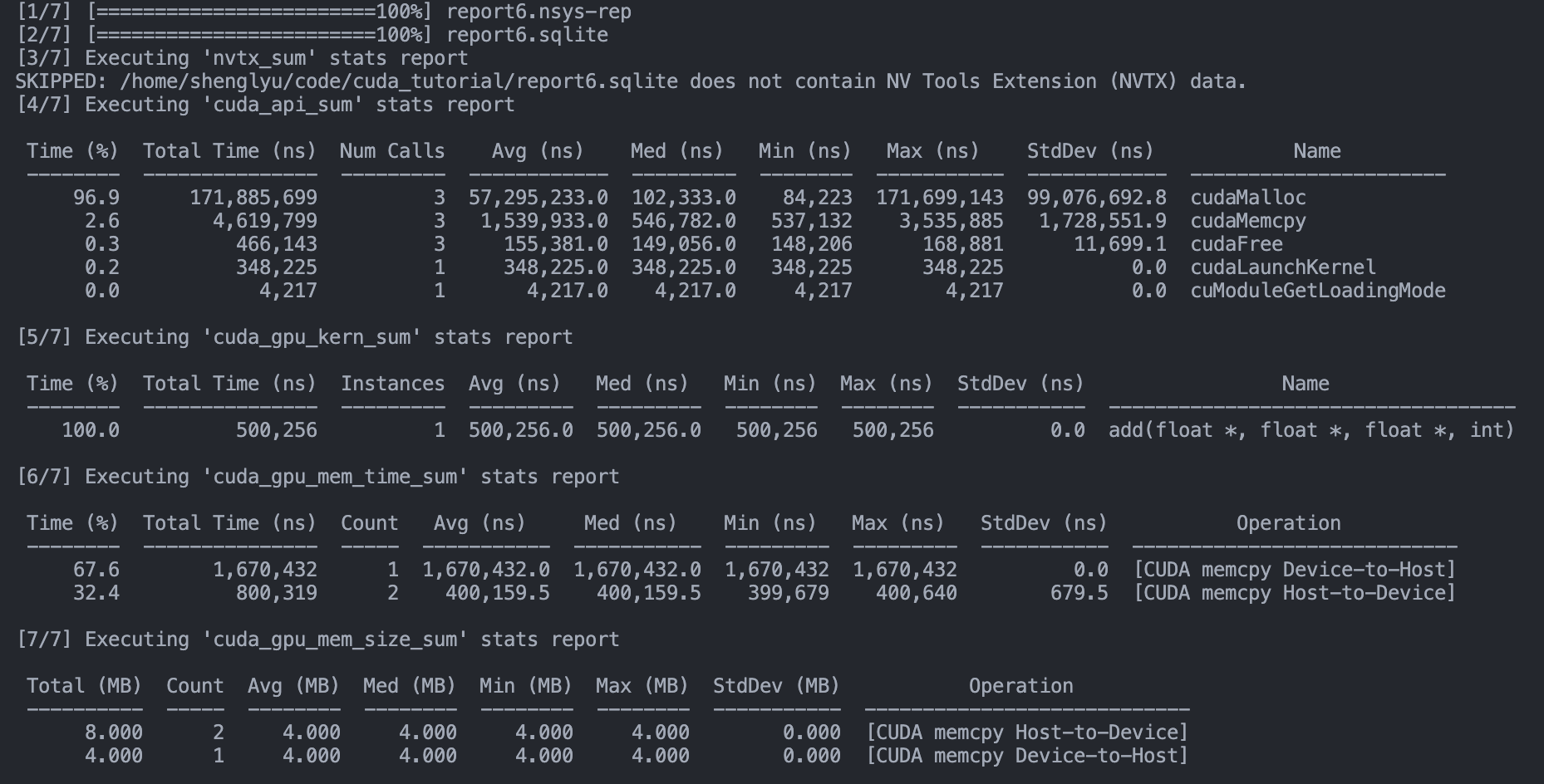 Notably, we can see the function run time:
 And we compare that with the original
 vector_add:
 There are roughly 64 times time savings.
Add in multiple blocks
Next, we can leverage multiple blocks. CUDA GPUs have many parallel processors grouped into Streaming Multiprocessors (SMs). Each SM can run multiple concurrent thread blocks. How many blocks we acquire? Since we have N elements to process, and we have 256 threads per block, the number of block is written by
int blockSize = 256;
int numBlocks = (N + blockSize - 1) / blockSize;
We have to consider how to index the array across several blocks and threads.
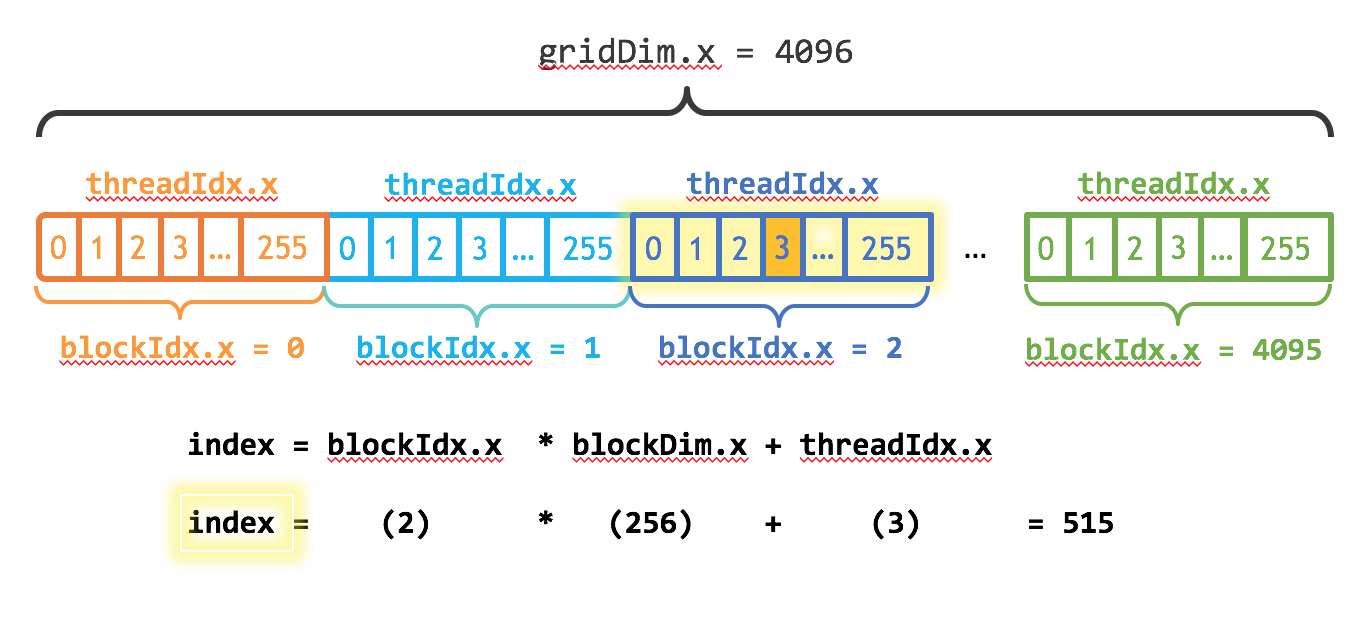 This is an illustration figure. The 1-D array is loaded in different blocks. Each thread gets its index by computing the offset to the beginning of its block. The start of each block is
 blockIdx.x * blockDim.x, and the offset is threadIdx.x. The stride is also altered by the number of threads in the grid. Therefore, we get
int index = blockIdx.x * blockDim.x + threadIdx.x;
int stride = blockDim.x * gridDim.x;
We can view the profile:
 See, it is way faster than the above.