Recently I’ve moved to Shenzhen, and I am working on establishing an atmosphere for study lol. And keeping myself away from phone is crucial. However, most of the existing logins require my verification code. This post shares the experience of how to automatically forward the SMS message containing “code” to telegram using the shortcut and automation in iOS system.
Before you read, you should be aware that
- iOS system: If you work on Android, you can develop an app very fast. We discuss iOS devices with automation and shortcut only
- Telegram: I assume you have the access to Telegram.
- You should be aware of the security of your actions. Do not spread it over the devices that you do not trust, as we will input the token directly.
- The methods cannot be used in any production environment, where the author of this post (me ofc) will not consume any responsibility for any costs and troubles.
Step 1: Create a Telegram bot
Search the @botfather in your TG and create a bot by entering /newbot.
Type in the bot name and user name.
You will receive the token. Keep it secret.
Step 2: Get the Chat ID
Type /start. Open your shell and type in
curl https://api.telegram.org/bot{YOUR_TOKEN}/getUpdates
and you will get a json file like:
{
  "ok": true,
  "result": [
    {
      "update_id": xxx,
      "message": {
        "message_id": xxx,
        "from": {...},
        "chat": {
          "id": <YOUR_CHAT_ID>,
          "first_name": "...",
          "last_name": "...",
          "username": "@username",
          "type": "private"
        },
        "date": xxx,
        "text": "/start"
      }
    }
  ]
}
Take note of the chat id.
Step 3: Create ShortCut
You can directly access Shortcut
Or you can create it in your own shortcut app:
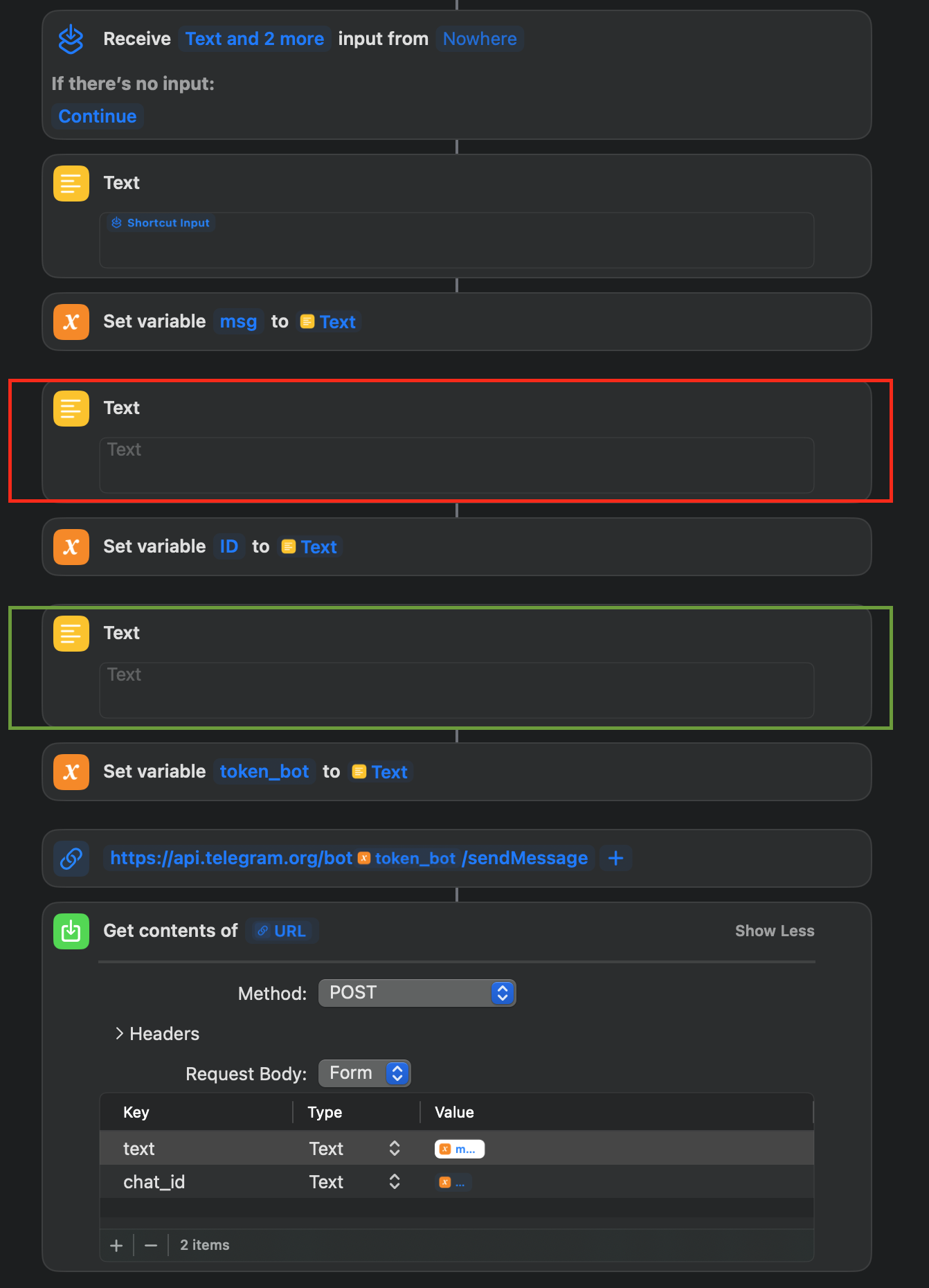 Either way, you should replace the red box with your
 <TOKEN_ID> and the green box with your <CHAT_ID>.
Save as the shortcut.
Step 4: Create Automation
In your iPhone-Shortcuts-Automation(Bottom)-"+", search “message”, fill the “code” or any other key words you want in “message contains”, and choose “Run Immediately”, choose Next. Click “My ShortCuts” and choose the shortcut we have created in Step 3. Then it should work.
Have a try!
References: [1] How to get Telegram Bot Chat ID · GitHub [2] Sending text to Telegram bot : r/shortcuts